
As per data, 12,14,076 candidates have applied for which SBI PO prelims exam will be conducted on 1st and 2nd August 2026. The admit cards for candidates whose applications are accepted are now available to download at SBI’s official website. After downloading the admit card, candidates must check all the details printed on it carefully, and in case of any error, they must contact the officials immediately. Candidates must ensure to carry a printout of the admit card along with them to their exam hall, as no entry will be allowed without it.
The direct official link to download the admit card is also provided below, as it has now been released officially at https://sbi.bank.in/hi/web/careers/current-openings.
Download your admit card and check your respective shift timing and date from the direct link shared below.
| SBI PO Prelims Admit Card 2026- Overview | |
| Exam Name | SBI PO 2026 |
| Mode of Admit Card | Online |
| Admit Card Release Date | 22nd July 2026 |
| Last Date to Download Admit Card | 2nd August 2026 |
| SBI PO 2026 Exam Date | 1st and 2nd August 2026 |
| Credentials Required | Registration Number/Roll NumberPassword/Date of Birth |
| Documents to Carry | Hardcopy of Admit Card + Valid Id Proof |
| Official website | www.sbi.bank.in |
What is SBI PO Prelims Exam Shift Timings?
| Shifts | Reporting Time | Gate Closing Time | Handwriting Sample | Exam Timings |
| Shift 1 | 8 am | 8:30 am | 8:30 am to 9 am | 9 am to 10 am |
| Shift 2 | 10:30 am | 11 am | 11 am to 11:30 am | 11:30 am to 12:30 pm |
| Shift 3 | 1 pm | 1:30 pm | 1:30 pm to 2 pm | 2 pm to 3 pm |
| Shift 4 | 3:30 pm | 4 pm | 4 pm to 4:30 pm | 4:30 pm to 5:30 pm |
How to Download SBI PO Prelims Admit Card 2026?
The applicants are advised to download their SBI PO Admit Card 2026 much before the exam date to avoid the last-minute rush. To download the admit card, a candidate must have the following requisites ready with him/her:
- Registration Number/Roll Number
- Password/Date of Birth
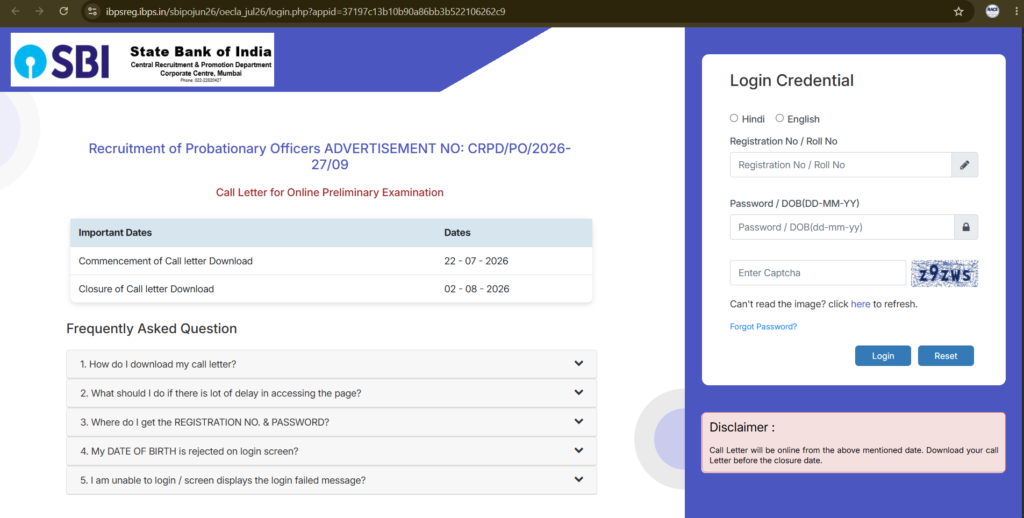
By filling in these two requisites, candidates can access admit cards. A candidate is required to download their admit card, take a printout of the same, and carry it to the venue of examination as proof of his/her eligibility for the examination. Follow the steps below to download the call letter.
- Visit the new official website of the State Bank of India at @www.sbi.bank.in.
- In the bottom left corner of the homepage, click on the “Careers” option.
- A new page with URL https://sbi.bank.in/web/careers opens.
- Click on the JOIN SBI link on the menu bar and then click on the “Current Openings” tab.
- Search for “Recruitment of Probationary Officers” in the Current Opening section and then click on it.
- Click on “Call Letter for Prelims Exam”, and a new page opens.
- Select Admit Card language and enter your Registration Number/Roll No. & Password/DOB generated at the time of registration.
- Download your SBI PO Admit Card 2026 and keep a copy for future reference.
Documents Required to Carry to Exam Hall
Candidates must carry the requisite documents to the SBI PO Prelims exam centre. Carry the original document and follow instructions given on admit card. The following documents are required along with the admit card:
- Printed SBI PO Admit Card 2026
- Valid Original Photo ID Proof such as Aadhar Card, PAN Card, Passport, Voter ID or Driving License
- Recent passport-size photographs
What Details are Mentioned on SBI PO Admit Card?
Candidates must check all the details printed on the admit card carefully and, in case of any mistake, contact the exam authority well before the exam date.
- Name of the candidate
- Gender
- Roll Number/Registration Number
- Applicant Photograph
- Timings
- Candidate’s Date of Birth
- Father’s Name & Mother’s Name
- Category & Subcategory
- Name of Centre
- Centre Address
- Post Applied
- Venue Address
- Essential instructions for the Exam
- Signature of candidate and counsellor
Do’s and Don’ts while downloading the SBI PO Prelims Call Letter 2026
- On downloading the SBI PO Prelims Call letter, one must ensure that the information mentioned on the Admit Card is accurate.
- Check the Venue and Time of the SBI PO Prelims Exam after you have downloaded the Admit Card for the same.
- The safekeeping of the Admit Card is essential to avoid any hassle during the examination.
- Check the photo and signature on the Admit Card. Make sure it is not smeared at any cost before the exam begins.
- Read all the guidelines mentioned on the SBI PO Call Letter carefully and follow them to avoid any trouble.